
Dear Camden County Schools Families,
We are excited to introduce Infinite Campus Groups, a new communication tool designed to make it easier to stay connected with your child's teachers, school, and school-based organizations.
As part of our ongoing effort to bring as much of our family communication as possible onto one platform, Groups will live right inside the Infinite Campus account you already use — no new app, no new login. Think of it as an online discussion board built into a tool you're already checking regularly.
With Groups, you can:
Read messages and updates from teachers, clubs, athletics, PTOs, and grade-level groups
Ask questions and participate in ongoing conversations
Stay connected with your child's school activities, all in one place
A few important things to know:
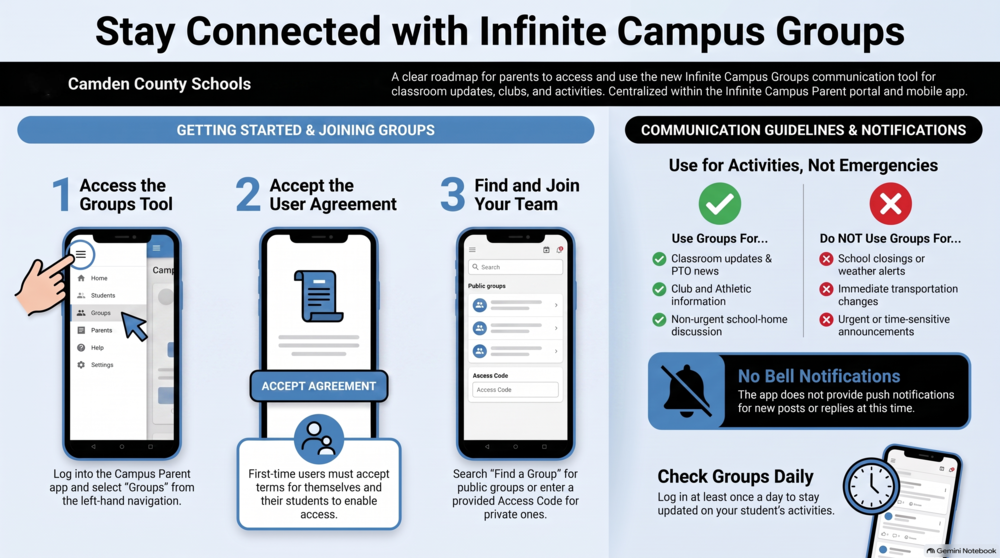
Groups are built for ongoing, day-to-day conversation, not emergency or time-sensitive communication. That means Groups will not be used for school closings, weather emergencies, immediate transportation changes, or other urgent announcements. Those messages will continue to come through our existing district communication methods, just as they do now.
Groups does not currently send a notification when a new post or reply is added, so you'll want to check in periodically by visiting your Groups in Infinite Campus. Infinite Campus has informed us that they are continuing to update the service, and notifications for posts and messages are an area where we hope to see improvements soon.
How Parents Can Access Groups:
Log In: Open the Campus Parent app or log into the portal on your computer.
Find the Tool: Click on Groups in the left-hand navigation menu.
Accept the Agreement: The first time you open the tool, you must accept the Groups User Agreement and Terms & Conditions. (Note: Parents also accept this agreement on behalf of their students).
Join a Group:
Navigate to Find a Group to search for and join public groups.
If joining a private group, enter the Access Code provided by the group's owner/coach.
In some cases, a group owner may add you manually, or you may be automatically added when your student joins a group.
Student Approvals (Under 18):
Safety and privacy are our top priorities. For any student under the age of 18, a parent or guardian must approve the student’s membership before they can participate in a group.
When a parent or guardian first opens the tool and accepts the User Agreement on behalf of their child, they are providing general consent for the student to use the Groups Platform. This does not automatically approve the student to participate in individual groups.
Here is how the approval process works:
The Trigger: A student under 18 is manually added to a group or requests to join one.
The Notification: The parent or guardian receives a notification in Campus Parent asking them to approve or decline the student’s membership in that specific group.
The Block: Until approval is granted, the student will see a message stating that guardian approval is required. The student cannot view the group or any of its conversations until the parent or guardian approves the request.
This process ensures that parents and guardians have the final say over each group their student participates in. Your student can view group conversations only after you approve the request.
Our goal is simple: fewer platforms, less confusion, and a more organized, collaborative experience for our families. We appreciate your partnership as we continue working to streamline our communication.
If you have questions about accessing Groups in your Infinite Campus account, please contact the data manager at your child's school.
Thank you for your continued support of Camden County Schools.